
The Events Calendar is a familiar name in WordPress, and we have used it on several client sites. Some of those clients still use it today. It covers a lot of ground, but working with it has left us with mixed feelings.
Our review of The Events Calendar is based on that client work. Our main frustrations are the customization process, the block editor experience, and the extra work needed to meet accessibility requirements. Add a substantial annual cost for the paid offering, and it becomes a plugin we recommend with reservations.
Overall score: 5.7/10 — useful with reservations.

Overview
- Setup & Onboarding – 8/10
- Editor – 4/10
- Performance – 5/10
- Features – 7/10
- Docs & Support – 7/10
- Pricing & Licensing – 3/10
Setup & Onboarding – 8/10
The setup is straight forward. There is an important difference between getting a calendar onto a site and integrating it into a finished client project. The first task is about entering events and choosing a view. The second is about making the calendar fit the site’s design, content workflow, and accessibility requirements.
Our reservations mainly concern that second stage. A standard calendar can be a useful starting point, but a custom design can quickly take you beyond settings and into implementation work. That needs to be included in the project estimate.
Editor – 4/10
The block experience is one of our biggest disappointments. The plugin supports Gutenberg, but in our client work it has felt like block functionality added on top of an older system. It does not give us the editing experience we expect from a plugin designed around blocks.
That distinction matters. We want to build a layout, adjust it in the editor, and give clients something that behaves consistently with the rest of their site. With The Events Calendar, we have found ourselves working around the plugin’s structure more than we would like.
Customization is possible, but it can be awkward. Legacy naming and exact template locations make the process harder to navigate. Changing output can mean finding the right file and reproducing the expected folder structure in the theme. Hooks and filters provide other routes, so template replacement is not the only option.
For us, the issue is the amount of work between “supports blocks” and “fits our project.” The blocks are a weak point, especially when a consistent Gutenberg workflow is a priority.
Performance – 5/10
Performance deserves more scrutiny than a long feature list suggests. Our client experience includes errors and operational disruption. Separately, the documentation and public support reports point to a calendar whose workload needs active management as an event database grows.
The vendor’s performance guide explains that displaying more events increases the cost of generating a view. A busy month grid can involve far more event data than a short list. It recommends limiting visible events, considering caching, and controlling how far recurring events are generated into the future.
Those are useful controls, but they also mean the defaults deserve attention. A project with frequent recurring events has different demands from a small business listing a few dates. Caching may help, while large caches and insufficient server resources can introduce their own maintenance concerns.
Our judgment is that performance is manageable, but not something we would take for granted on a busy client calendar. The 5/10 rating reflects documented scaling considerations, reported problems, and our reliability experience—not measured page-speed results. Before committing, we would test the intended views and recurrence volume on hosting comparable to production.
Features – 7/10
Breadth is the plugin’s strongest argument. The free core plugin includes month, list, and day views, saved venues and organizers, event search, categories and tags, and calendar exporting.
What it does not include is proper frontend filtering, where visitors can narrow a busy calendar by things like category, venue, organizer, location, or price. For many of the client implementations we work on, that makes the free version too limited on its own.
The paid plans add a substantial amount of functionality, including recurring events, additional views, advanced filtering, community submissions, virtual events, and more advanced ticketing. On paper, it is a very complete ecosystem.
The catch is that much of this functionality is still spread across separate plugins. Filtering, for example, is handled by the separate Filter Bar plugin. Ticketing and community submissions also have their own plugin components. These may be included in the plan you purchase, but they are not simply folded into one consolidated Events Calendar plugin.
For us, letting visitors narrow a busy calendar by category or venue is a basic requirement, so needing another plugin just to provide that functionality feels unnecessarily fragmented.
For organizations with substantial event requirements, having all of these tools within one ecosystem still has real value. But buying a package can leave you maintaining multiple interconnected plugins rather than one consolidated event-management plugin. That means more updates, dependencies, and compatibility checks for an agency to keep track of.
Accessibility has required significant extra work on our projects. Calendar filtering and related interfaces have needed remediation to meet client requirements. We would budget for accessibility testing and fixes rather than assume the default output will meet a particular accessibility brief.
That reflects our experience with the implementations we have worked on, rather than a blanket audit of every version or configuration. Still, for agency work, accessibility effort is part of the product’s real implementation cost.
Docs & Support – 7/10
The documentation deserves more credit than the editing experience. There is substantial material covering setup, recurring events, troubleshooting, performance, template customization, hooks, and filters. The new-user primer provides a starting point, while developer guides go into practical implementation details.
The template documentation includes concrete mappings from plugin files to theme override paths. That is useful when you know what you are trying to change. The filters and actions guide also makes clear that copying templates is not the only customization route.
Where it becomes less comfortable is finding the right approach for a specific implementation. Classic editing, blocks, different views, and legacy naming create a lot of context to work through. The guidance is detailed, but the reader still needs to understand which template system or product a particular example applies to. We would describe it as a substantial developer resource with a learning curve.
Customer feedback on support is more positive than our frustrations with the plugin might suggest. Recent Trustpilot reviews praise patient troubleshooting and responsive staff, while others describe delays, account problems, or unresolved technical issues. These are individual customer reports, not a support test we conducted.
Our 7/10 assessment gives credit for documentation depth and useful public support responses, while allowing for navigation friction and uneven reported outcomes. We would not dismiss the documentation as thin, or assume that a difficult customization means the support team is unhelpful.
Pricing & Licensing – 3/10
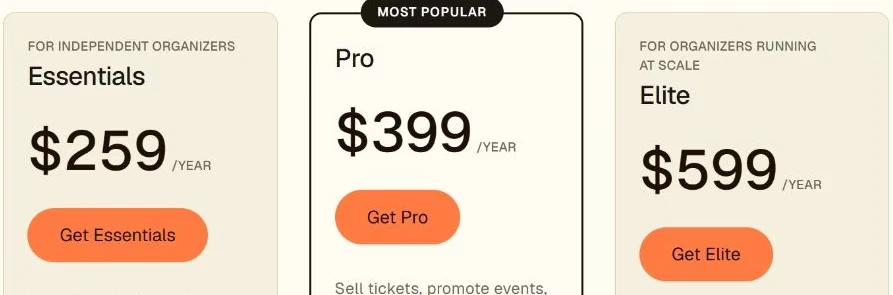
At the time of checking, the Liquid Web pricing page lists Essentials at $259/year, Pro at $399/year, and Elite at $599/year. The free core plugin remains a separate option.
Essentials currently includes event filters, so the criticism is not that every bundled feature costs extra. It is that a package price does not consolidate the underlying plugins. For a simple calendar, that price and maintenance overhead are hard to justify; a larger events operation may get more value. Budget for the add-on stack alongside customization and accessibility work.
The renewal-related disruptions we experienced also reduced our confidence. Our expectation is that locally installed functionality should remain usable after a missed renewal, even if updates, support, or connected services require an active subscription.
Final verdict
The Events Calendar is useful with reservations. Its broad functionality can justify a place on complex projects, but block editing, customization, accessibility work, paid pricing, and the interconnected add-on stack make it a harder recommendation for simpler client sites.
We would consider it when the project genuinely needs a broad event-management system and has a budget for development and maintenance. We would be much more cautious when the brief is a straightforward calendar, a smooth block-editing experience, or tightly scoped accessibility work.
Popularity makes it a familiar option. It does not make it an automatic choice for the next client build.
Overall score: 5.7/10 — useful with reservations.
See The Events Calendar’s current plans or explore the free plugin.